
SaaS Keyword Research
Find keywords that actually drive signups – Not just traffic
 Andrew Fennell | Last updated 14 October 2026
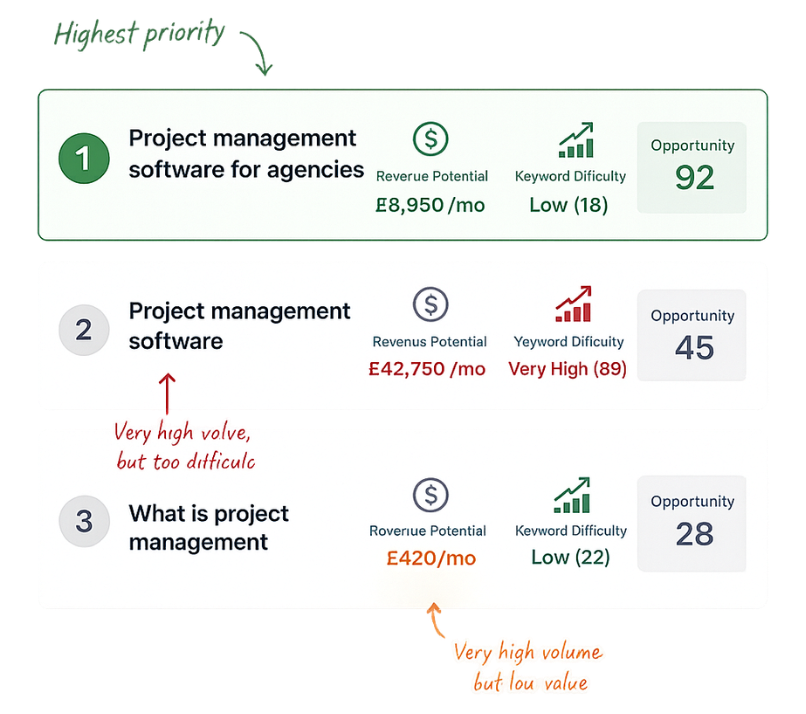
SaaS keyword research is about finding realistic keywords that can drive signups and revenue through Google Rankings and AI citations.
It is not about chasing huge volumes of largely worthless traffic or trying to compete for headline terms dominated by the biggest brands in your market.
I have made both of those mistakes before when growing SaaS businesses.
In this guide, I will walk you through the process I use to:
It is based on what I learnt while growing a SaaS business to £1 million in revenue, and it is the same underlying process built into the RevPages opportunity discovery feature.
Why SaaS keyword research is different
SaaS keyword research is different from keyword research for a publisher, ecommerce shop or local business.
For a content publisher, attracting more traffic can directly increase advertising revenue. An ecommerce business can usually connect a search to a specific product and purchase. SaaS buying journeys are often less direct.
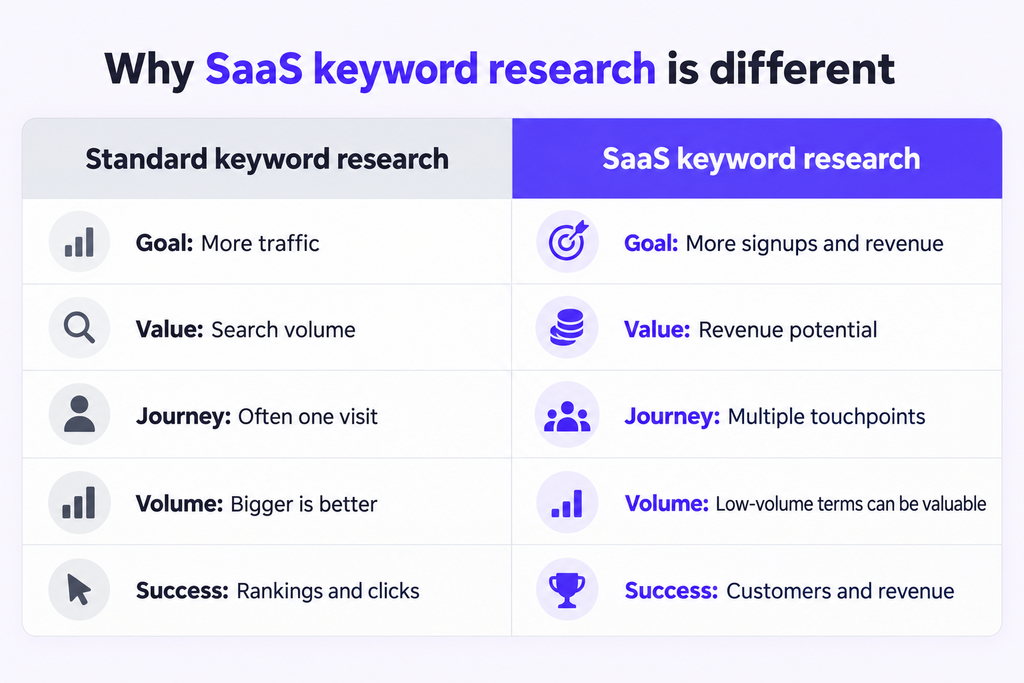
A B2B SaaS customer might discover a product through a feature search, return through a comparison page and only sign up after reading an industry-specific landing page. The value of that customer may then build through recurring payments over several months or years.
That means SaaS keyword research needs to account for more than search volume. You also need to consider:
- How closely the search relates to the problem your product solves
- Where the searcher is in the buying journey
- How likely the page is to generate a signup
- The lifetime value of a new customer
- Whether your website already ranks for the term
- How difficult it will be to achieve a commercially useful position
SaaS markets also tend to produce large numbers of valuable, low-volume searches. A keyword might receive only 50 searches per month, but if it attracts buyers worth thousands of pounds each, it can be more valuable than a broad informational term receiving thousands of searches.
The objective is therefore not to find the keywords capable of generating the most traffic. It is to find the realistic opportunities capable of producing the greatest revenue uplift
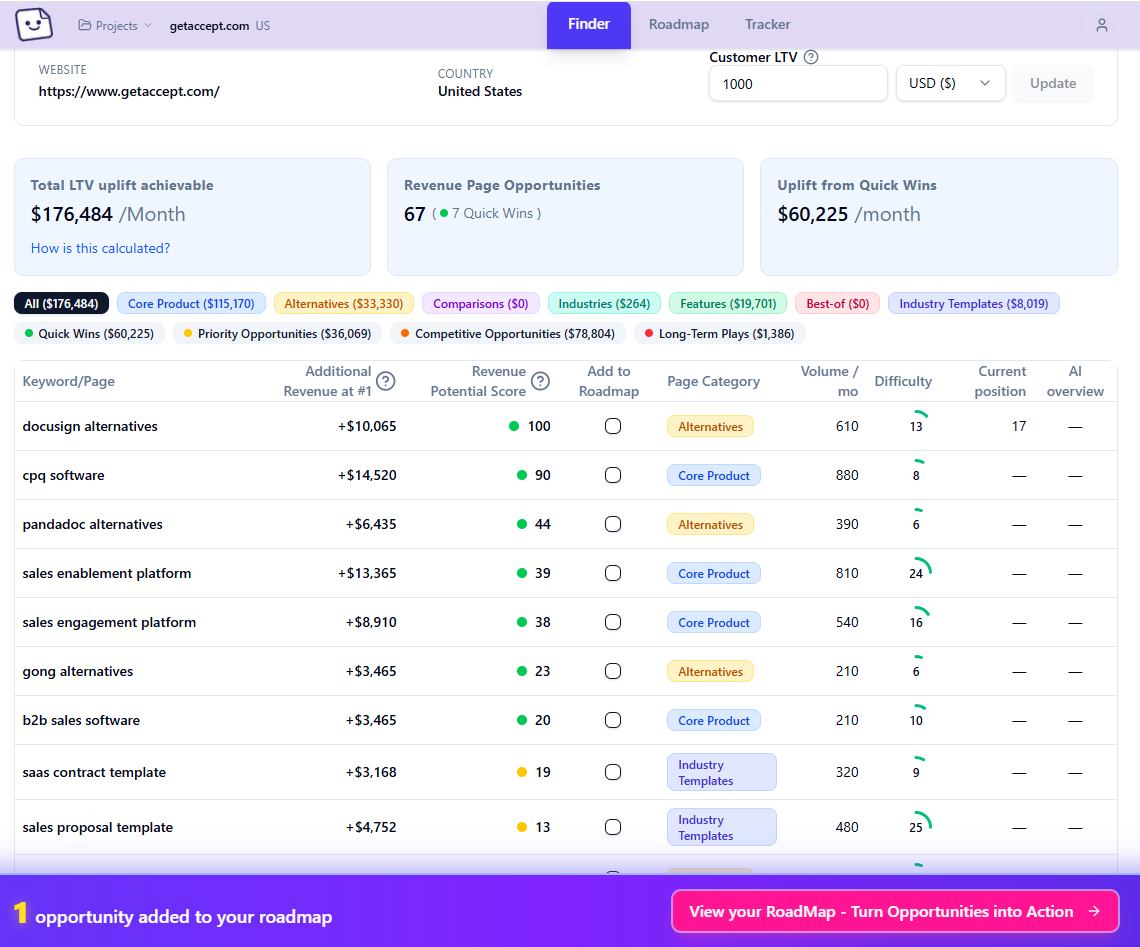
Similar to the reports generated by RevPages
Ignore broad informational content (for now)
If your immediate goal is to generate signups and revenue, I would not start by publishing dozens of broad informational articles, such as “what is payroll”.
Informational content absolutely has value. It can:
Informational content has a place in SEO, but it is usually a slow and indirect route to sales.
Someone searching “what is employee onboarding?” could be a student or researcher. Someone searching “best employee onboarding software” is probably evaluating products — so that is where I would focus first.
AI Overviews are also reducing clicks to informational content, making it less commercially attractive.
The exception is a new website with little content, which may need a few informational guides to build relevance and support its commercial pages.
Focus on the seven profitable SaaS page types
Most commercially valuable B2B SaaS keywords fit into seven repeatable page types, which will not only drive direct websites visits – but also help your product to get picked up in by AI search and LLMs
These are also the page types RevPages looks for automatically.
Feature pages
Showcase the individual features and capabilities your product offers to attract customers searching for specific solutions.
e.g. CRM Workflow Automation, Revenue Forecasting Reports
Industry pages

Target customers in specific industries by demonstrating how your product solves their unique problems and challenges.
e.g. CRM for Recruitment Agencies, Accounting Software for Construction
Core product pages

Rank for your highest-intent product keywords and attract buyers actively searching for software like yours.
e.g. Project Management Software, Expense Management Software
Comparison pages
Capture prospects comparing products by helping them understand the differences between leading solutions.
e.g. HubSpot vs Salesforce, Asana vs Monday
Alternative pages
Reach buyers looking to replace an existing product and present your software as a compelling alternative.
e.g. Salesforce Alternatives, Notion Alternatives
Best-of lists

Attract high-intent buyers researching the best software options before making a purchasing decision
e.g. Salesforce Alternatives, Notion Alternatives
Templates and tools
Generate qualified traffic with practical resources that naturally introduce your product as the ideal solution.
e.g. Sales Proposal Template, Employee Onboarding Checklist
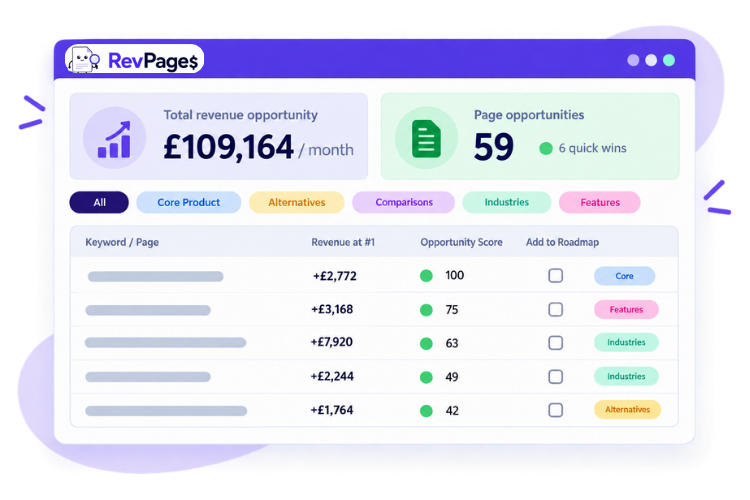
Find your most valuable SaaS keywords in 90 seconds
Revenue forecasted. Instantly prioritised by revenue-potential and ranking achievability.
Brainstorm a keyword list for each page type
Start by building a separate list for each of the seven page types.
For example, an employee scheduling platform might begin with:
- Core product: employee scheduling software
- Feature: automated shift scheduling
- Use case: create employee rota online
- Industry: staff scheduling software for restaurants
- Alternative: Deputy alternatives
- Comparison: Deputy vs When I Work
- Best-of: best employee scheduling apps
- Template: weekly staff rota template
At this stage, collect plenty of ideas – at least 20 for each. You will filter, combine and prioritise them later.
How to find profitable keywords
Here are the most effective ways of finding keywords that fit into the profitable page types
Ask ChatGPT
ChatGPT is the obvious place to start and will probably uncover 80–90% of the core opportunities for most SaaS websites.
Give it your website, explain the product and target customer, then ask for keyword ideas grouped by the seven page types above. Ask it to avoid broad informational topics and explain the likely intent behind each suggestion.
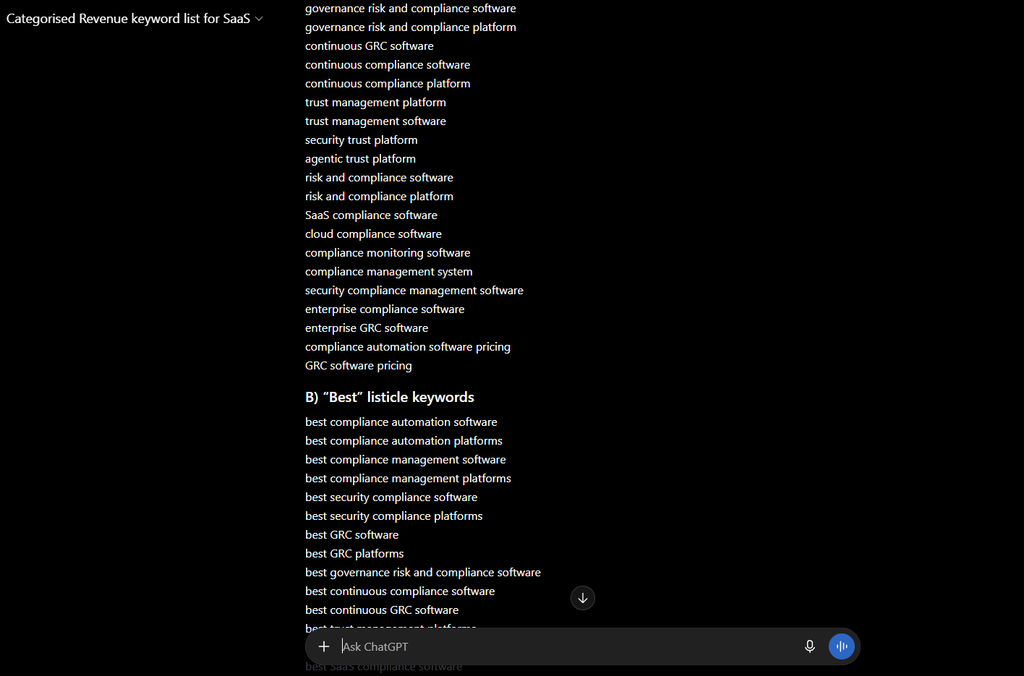
You can use my custom GPT for this if you want the process pre-structured.
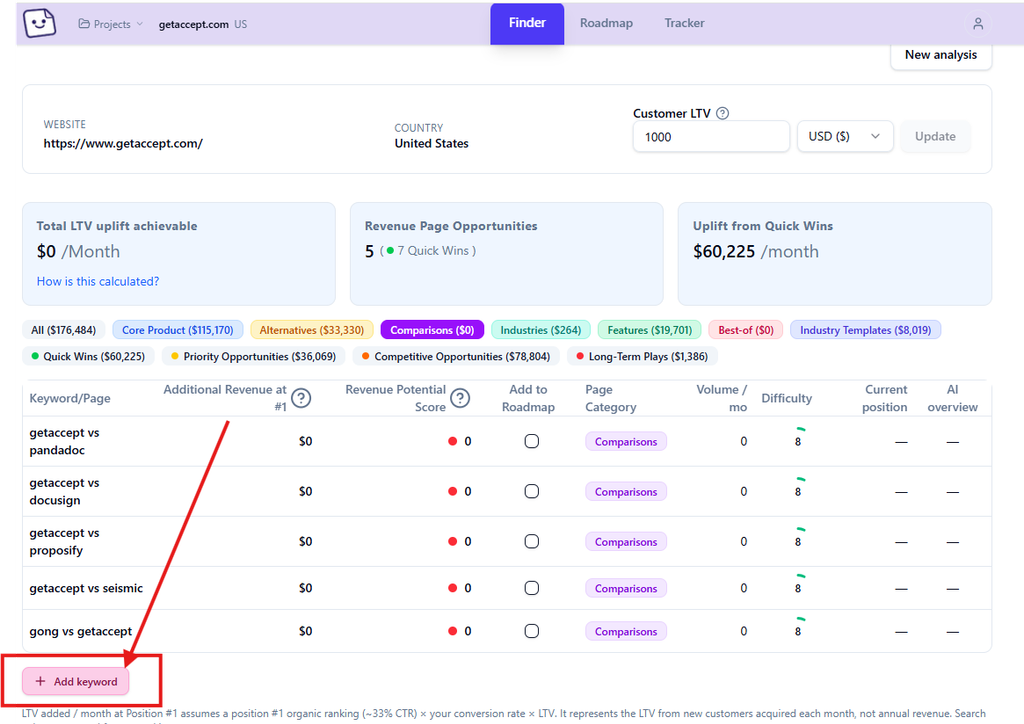
RevPages also does this stage automatically by analysing the website and generating opportunities by page type. However, no automated system will know everything happening in your market.
To find more niche or overlooked terms, use the methods below as well.
If you use RevPages, you can add anything useful you uncover to your report individually.
Check competitor websites
Look beyond your competitors’ homepages. Study their navigation, feature pages, industry pages, resource libraries and comparison content.
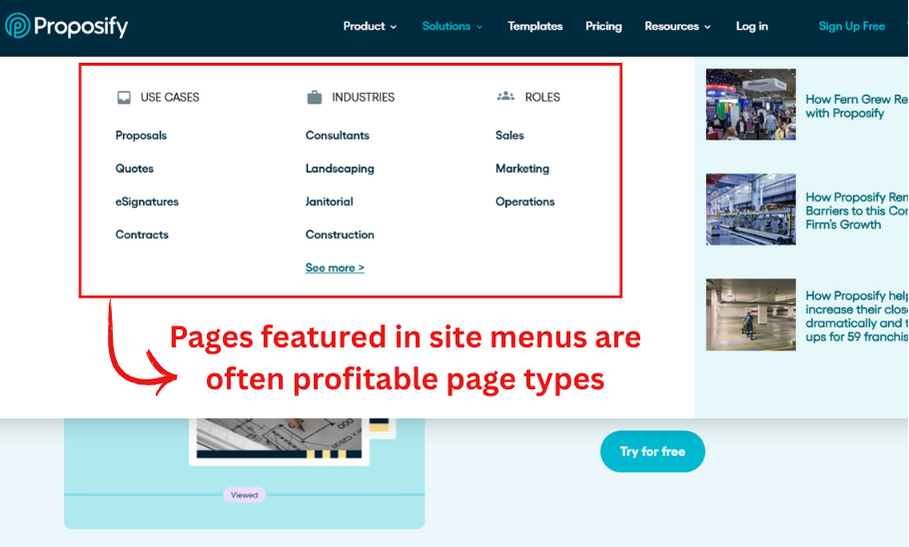
You are looking for patterns such as:
- Features several competitors have created dedicated pages for
- Industries they are actively targeting
- Competitors they compare themselves against
- Templates or free tools they use to attract potential customers
- Language they repeatedly use to describe customer problems
Then run their domains through an SEO tool and filter the ranking pages for commercially relevant terms. Do not simply copy every keyword. Use competitor research to reveal demand and angles you may have missed.
Study the search results
Search Google for your initial ideas and inspect what already ranks.
The results tell you what Google believes the searcher wants. If a query returns product landing pages, it probably needs a landing page. If it returns list articles, you will usually need a best-of page. If every result is a free template, a sales page is unlikely to satisfy the intent.
Also study:
- Autocomplete suggestions
- Related searches
- People Also Ask questions
- Wording used in page titles
- More specific modifiers such as “for agencies”, “for remote teams” or “with approval workflows”
This is one of the simplest ways to turn a generic keyword into several more attainable, higher-intent opportunities.
Listen to your customers
Keyword tools show what people search for. Customers show you how they describe the problem before they know the accepted keyword.
That makes customer language one of the best sources of original keyword ideas.
You can collect it from:
- Sales calls and demo recordings
- Support tickets and live-chat transcripts
- Onboarding calls and questionnaires
- Cancellation reasons and exit surveys
- Product reviews of your own software
- Reviews of competing products on G2, Capterra and Trustpilot
- Reddit, Quora and specialist communities
- LinkedIn posts and comments from your target buyers
- Internal site-search data
- Questions sent to sales and support teams
- Feature requests and product-feedback boards
Pay particular attention when the same phrase, problem or requested feature appears repeatedly. It may represent a search opportunity, but it is commercially useful customer research even if search volume turns out to be tiny.
Group keywords into pages and avoid cannibalisation
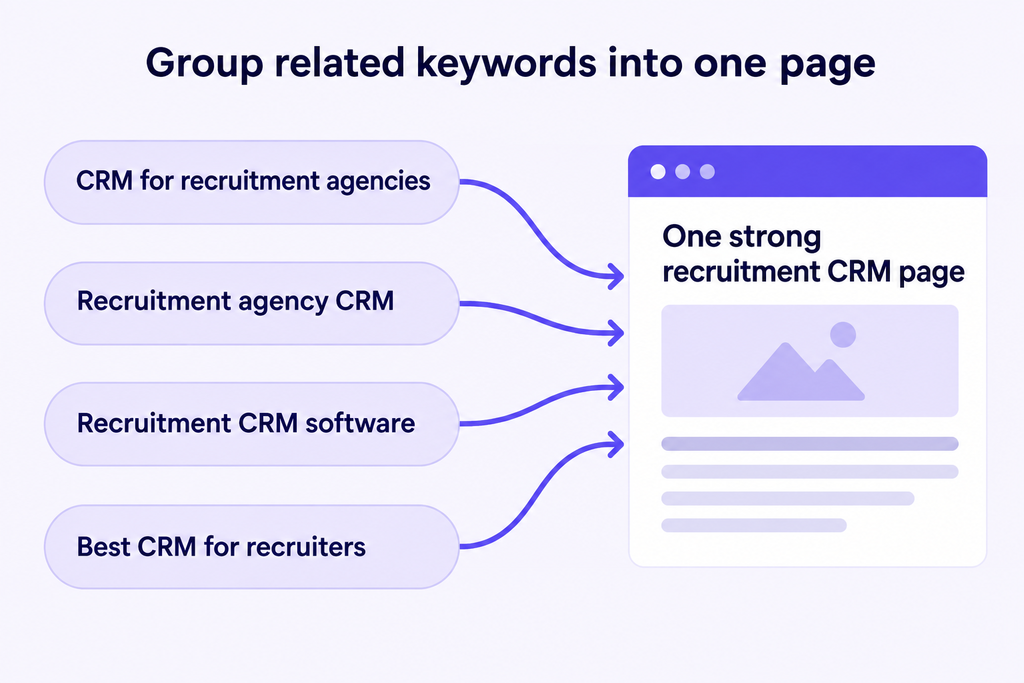
Do not create a separate page for every keyword. Similar searches such as “CRM for recruitment agencies”, “recruitment agency CRM” and “recruitment CRM software” will usually belong on one strong page.
Creating multiple pages for the same intent can cause keyword cannibalisation, where your pages compete against each other and Google struggles to decide which one to rank.
Group similar keywords together, choose one as the primary target and use the others as secondary terms. If you are unsure whether two keywords belong on the same page, search both on Google. If similar pages appear in both sets of results, they can usually be targeted together. If the results are different, create separate pages.
RevPages does this automatically for all discovered opportunities.
Add search data to your list
You should now have a large collection of potential keywords. The next stage is to add enough data to compare them properly.
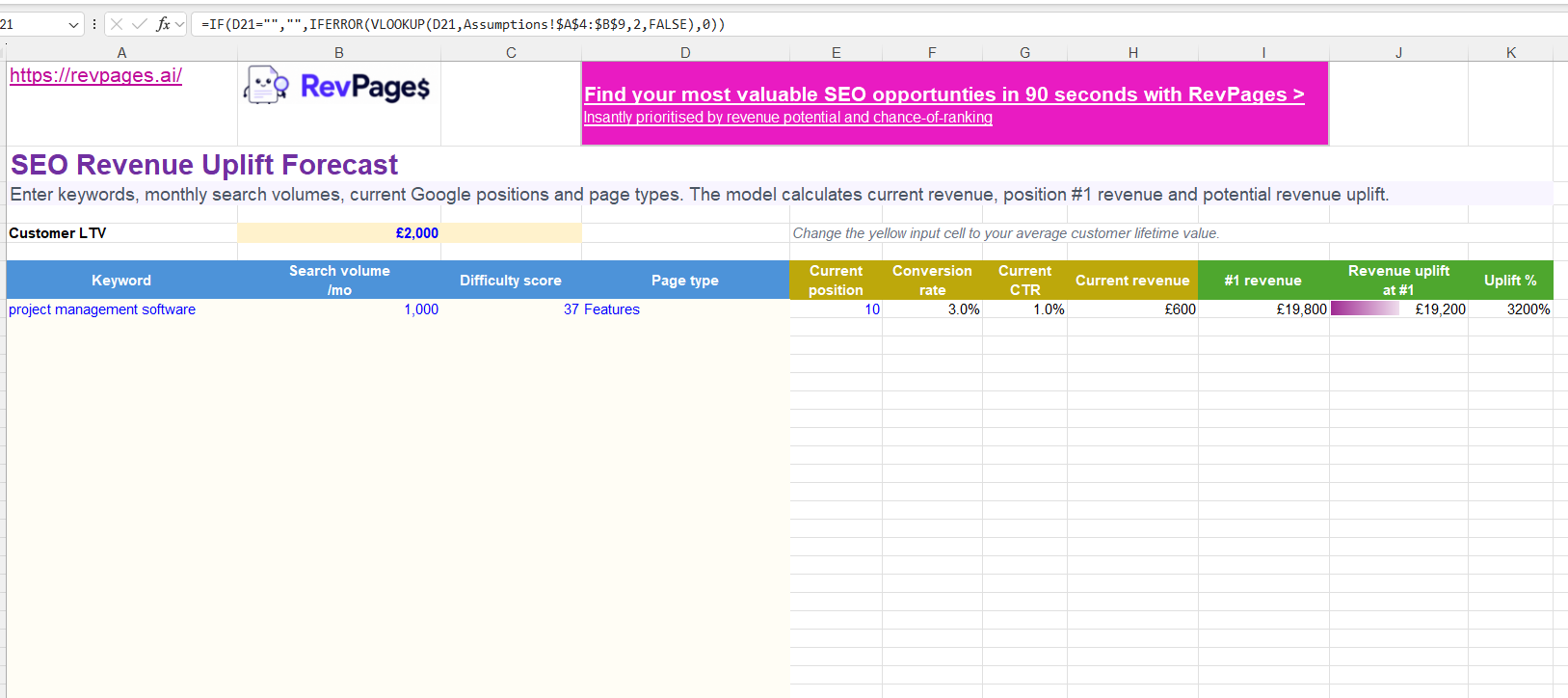
Use a platform such as Ahrefs or Semrush to record three core metrics in a spreadsheet:
| Search Metric | Why it matters |
|---|---|
| Monthly search volume | Estimates the number of searches and helps you compare the size of the demand. |
| Keyword difficulty | Gives you a rough indication of the authority and links that may be required to compete. |
| Current position | Shows whether your site already ranks and whether improving an existing page could be faster than creating a new one. |
None of these figures is definitive on their own.
Search volume is an estimate, difficulty scores vary between tools and a single domain-level metric cannot judge the quality of the page you plan to create. Rankings also move constantly.
They are still valuable. You do not need perfect data; you need consistent data that helps you make better decisions than guesswork would.
You can organise all of this in your own spreadsheet or use my free SEO revenue forecasting spreadsheet, which already contains the calculations covered in the next sections.
What about AI search and LLM traffic?
People are increasingly discovering SaaS products through tools such as ChatGPT, but reliable data on prompt volumes, visibility and clicks is still limited.
For now, use traditional search data as your main source of measurable demand, but do not treat it as the whole market. The same high-intent pages built around features, comparisons, alternatives and industries can also give AI tools clear information to reference when recommending products.
LLM visibility should therefore be treated as an additional benefit rather than something excluded from your keyword strategy because it cannot yet be forecast accurately.
What about zero-volume searches?
Keep relevant zero-volume keywords on your list.
SEO databases do not capture every search, especially new phrases and very specific B2B queries. A term can also become more popular as a product category develops.
Treat zero as “no measurable volume found”, not proof that nobody searches.
They are always worth holding on to, and revisiting in the future
Calculate the revenue potential of each keyword at position #1
This is the step most SaaS keyword research processes miss, which is why they often produce traffic without producing many signups.
Free SEO Revenue Calculator
See how much revenue a page could generate at Google positions #1, #2 and #3.
Search volume alone tells you nothing about the value of a visitor.
To estimate monthly revenue at a particular ranking position, use:
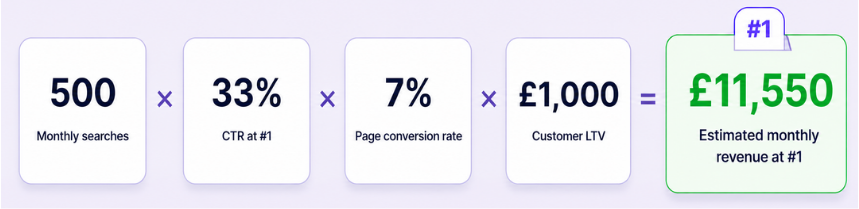
Monthly revenue potential = search volume × ranking CTR × landing page conversion rate × customer lifetime value
You need four inputs:
- The keyword’s estimated monthly search volume
- The percentage of searchers expected to click your result at a given position
- The percentage of those visitors expected to become customers
- The average lifetime value of a customer
RevPages uses the following starting conversion assumptions:
| Page type | Example keyword | Estimated conversion rate |
|---|---|---|
| Core Product | project management software | 5% |
| Competitor Alternatives | Asana alternatives | 5% |
| Competitor Comparisons | Asana vs Monday | 7% |
| Industry | project management software for agencies | 4% |
| Features | client project management software | 3% |
| Best-of Lists | best project management software | 2% |
These are assumptions, not universal facts. Replace them with your own conversion data once you have enough of it.
For click-through rate, RevPages uses the following simple assumptions backed by the latest public data:
| Google position | Estimated CTR | Visits from 1,000 searches |
|---|---|---|
| #1 | 33% | 330 |
| #2 | 18% | 180 |
| #3 | 12% | 120 |
| #4 | 7% | 70 |
| #5 | 5% | 50 |
| #6 | 4% | 40 |
| #7 | 3% | 30 |
| #8 | 2% | 20 |
| #9 | 1.5% | 15 |
| #10 | 1% | 10 |
Again, real CTR will vary by query, device and search-result layout. The point is to use one sensible model across all your opportunities so they can be compared consistently.
Imagine you sell a SaaS product with an average customer lifetime value of £1,000. You find a comparison keyword with 500 monthly searches.
At position one, the estimated monthly revenue would be:
| Input | Value |
| Monthly search volume | 500 |
| Position-one CTR | 33% |
| Comparison-page conversion rate | 7% |
| Customer lifetime value | £1,000 |
| Estimated monthly revenue | £11,550 |
The calculation is:
500 × 0.33 × 0.07 × £1,000 = £11,550
This does not mean the page is guaranteed to generate exactly £11,550 every month. It is an SEO revenue forecast. Its value lies in comparing opportunities using the same commercial logic rather than assuming the highest-volume keyword must be best.
RevPages performs this calculation automatically for every keyword, and my free forecasting spreadsheet does the same if you want to run it manually.
Turn hours of keyword research into 90 seconds
Automatically discover high-intent opportunities, forecast their revenue potential and see what to target first.
Calculate the revenue uplift available
Potential revenue at number one is useful, but it does not tell you what your website stands to gain.
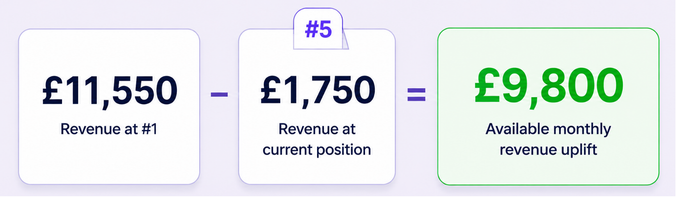
Suppose you already rank fifth for the comparison keyword in the example above. At an estimated 5% CTR, its current monthly revenue would be:
500 × 0.05 × 0.07 × £1,000 = £1,750
The revenue uplift available from moving to position one is therefore:
£11,550 − £1,750 = £9,800 per month
Knowing potential uplift is incredibly important. If you already rank second, the remaining uplift may be much smaller than the headline total revenue number suggests. Improving the page could still be worthwhile, but it should not automatically sit above an opportunity for which your site currently has no visibility.
For every keyword, record:
- Estimated revenue at position one
- Estimated revenue at the current ranking
- The difference between the two
That difference is the available revenue uplift.
It changes keyword research from “How valuable is this search?” to the much more useful question: “How much additional revenue could our site specifically gain?”
Score each opportunity on revenue potential and difficulty
The next mistake is to chase only the largest revenue figure or only the easiest keyword.
A keyword worth £30,000 per month is not your best immediate opportunity if reaching page one would take several years. Equally, an easy keyword is not useful if it has almost no commercial value.
You need the best blend of:
- Available revenue uplift
- Ranking difficulty
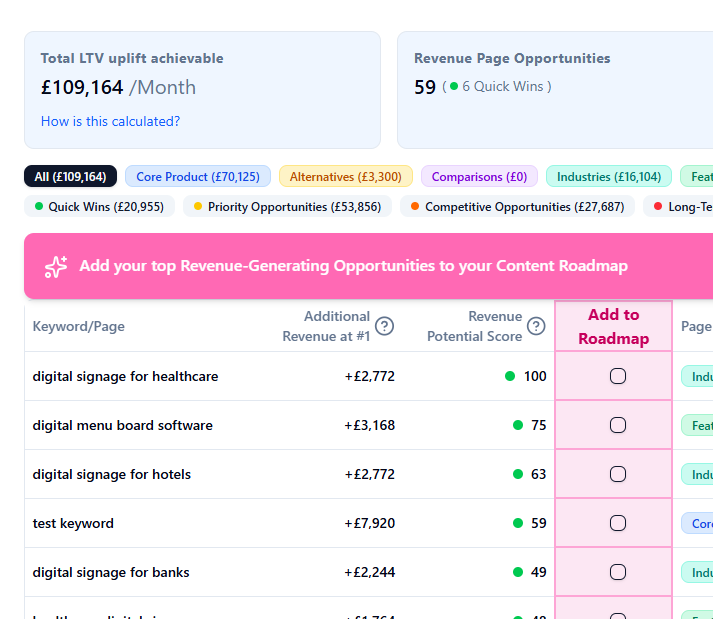
RevPages calls this Revenue Opportunity score.
Free SEO Opportunity Scoring tool
Enter your keyword opportunities, search volumes, difficulty scores, current rankings and customer LTV. The tool will score and prioritise them based on their potential revenue uplift and ranking achievability.

It begins with the estimated revenue uplift, then applies a difficulty factor that falls increasingly sharply as keyword difficulty rises. It also adjusts for current position. For example, a keyword sitting between positions 11 and 20 may deserve extra attention because a realistic improvement could move it onto page one. A keyword already in the top three has less untapped upside, while an extremely difficult unranked term may be a much longer project.
The difficulty factor in RevPages is:
((100 − keyword difficulty) ÷ 100)⁴
Additional reductions are applied to very difficult terms: scores of 60 or above are reduced further, with a steeper reduction from 70 upwards. This stops a huge theoretical revenue number from making an extremely difficult keyword look like an immediate priority.
You do not need to recreate the full model to make a useful manual score. A simple approach is to rate each opportunity from one to five for revenue uplift and ease of ranking, then multiply the two figures.
| Factor/Score | 1 | 3 | 5 |
|---|---|---|---|
| Revenue uplift | Low | Meaningful | Exceptional |
| Ease of ranking | Very difficult | Achievable | Relatively easy |
For example:
| Keyword | Monthly uplift | Revenue score | Ease score | Priority score |
|---|---|---|---|---|
| Competitor A vs your product | £9,800 | 5 | 4 | 20 |
| Broad software category | £25,000 | 5 | 1 | 5 |
| Niche industry software | £4,500 | 3 | 5 | 15 |
The broad category has the highest theoretical value, but it falls to the bottom once difficulty is considered. The comparison term becomes the first priority because it combines strong commercial upside with a realistic route to ranking.
This simplified score will not be mathematically perfect. It does not need to be. It creates a rational order of work and makes your assumptions visible to the rest of the team.
Before finalising the order, manually inspect the current search results. Difficulty scores cannot reliably detect every issue, such as a SERP dominated by household-name brands, a mismatch in search intent or results with unusually strong product pages.
Turn your scored list into a prioritised roadmap
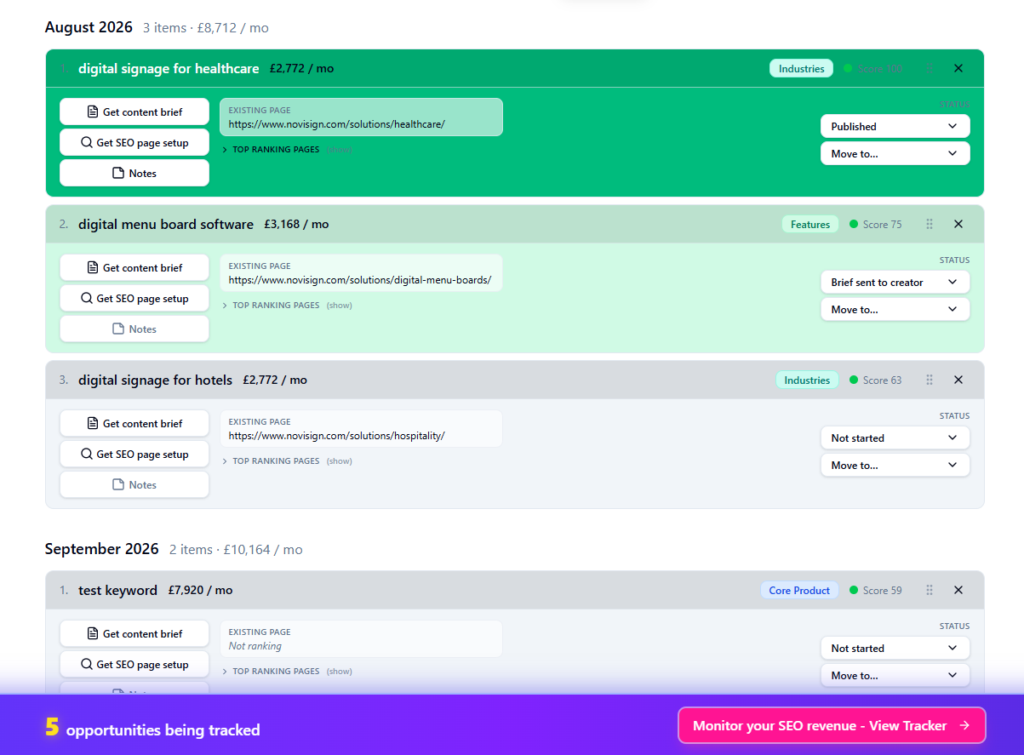
A scored spreadsheet is only valuable if it changes what you publish.
Sort the list by opportunity score, then review the top opportunities manually, and decide whether each opportunity needs:
- A new page
- An update to an existing page
- A new section added to an existing page
- Supporting content or internal links
- More authority before it becomes realistically attainable
I would then build a roadmap around your actual monthly capacity.
If you can produce four strong pages per month, do not create a plan containing 40 vague priorities. Choose the best four, assign each one a page type and target keyword cluster, and define what needs to make the page better than the current results.
A sensible early roadmap will usually contain a mixture of:
- Quick wins where you already rank near page one
- New high-intent pages with attainable competition
- Larger commercial opportunities that will take longer to mature
RevPages automates this stage by turning the strongest opportunities into a revenue-prioritised monthly roadmap. It can also create a brief for each page, covering the target keywords, search intent, recommended structure and key competitors.
Whether you use RevPages or a spreadsheet, the principle is the same: publish in the order most likely to create meaningful commercial returns.
That is the real purpose of SaaS keyword research.
You are not trying to collect the largest possible list of keywords or generate the biggest traffic graph.
You are deciding which pages give your business the clearest, quickest route to more customers and revenue.
If you want to automate this entire process - give RevPages SaaS keyword research tool a try.
Turn hours of keyword research into 90 seconds
Automatically discover high-intent opportunities, forecast their revenue potential and see what to target first.
- Why SaaS keyword research is different
- Ignore broad informational content (for now)
- Focus on the seven profitable SaaS page types
- Brainstorm a keyword list for each page type
- Group keywords into pages and avoid cannibalisation
- Add search data to your list
- Calculate the revenue potential of each keyword at position #1
- Calculate the revenue uplift available
- Score each opportunity on revenue potential and difficulty
- Free SEO Opportunity Scoring tool
- Turn your scored list into a prioritised roadmap